Transmit From File Application (transmit_from_file_app)
Transmits sampled waveform data from a file on platform’s rf ouput port.
Description
The transmit_from_file_app application reads in digital signal waveform samples from a binary file and transmits the waveform from the specified platform’s output RF port. Samples in the file may be real or complex in the short or float format. A RCC component translates the specified format to complex short used by the processing path as shown in Figure 1. Next, the complex short samples are upconverted from the user defined data rate to the system rate using an interpolator with CIC filtering. The default minimal system rate is 40 MSps supporting a total system bandwidth of 40 MHz. The user may also specify a frequency offset from the specified center carrier within the 40 MHz system bandwidth from -20 MHz to 20 MHz from the defined carrier frequency implemented by the complex mixer component.
To maintain precision of the desired user rate, actual transmit sample rate is determined by the the upsample factor and user data rate. The upsample factor is calcuated by deriving the ceiling on the minimal default rate divided by user rate. For example, if the rate of 270.833 kbps is required, then:
upsample_factor=ceil(minimal_system_rate/data rate) = ceil(40,000,000/270833) = 148; sample_rate = data_rate * upsample_factor = 270833 * 148 = 40083284 Hz;
The components shown in the dashed box in Figure 13: comprise the digital radio controller (DRC) whose properties are configured and managed by the DRC worker.
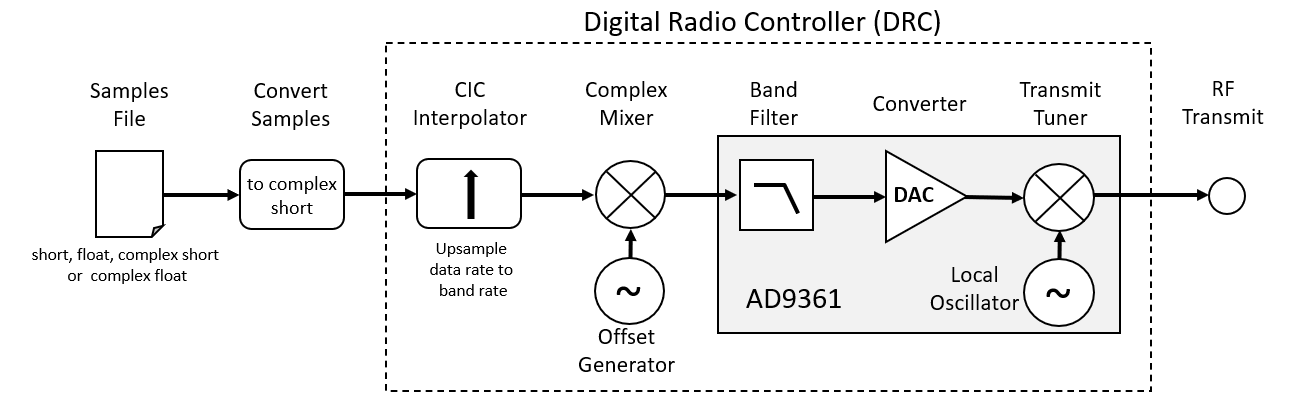
Figure 13: Transmit from file processing path.
Figure 14: shows the RF output bandwidth allocation convention for the transmit_from_file_app applications. The system bandwidth is set by default to 40 MHz. Using the application, a user defines the desired carrier center frequency, signal offset frequency, offset bandwidth, and signal data rate. The data rate will dictate the signal bandwidth. The offset bandwidth must be set to a minimal size to support the offset frequency or untended filtering of the signal will occur.
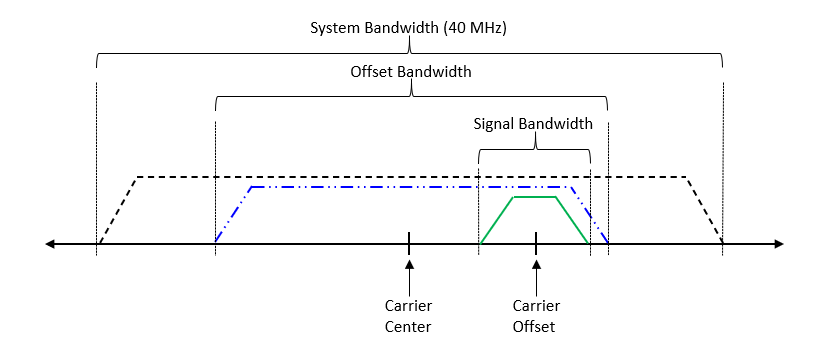
Figure 14: Transmit from file band specification.
Note: As shown in Figure 14:, the images produced by the transmit offset setting become more pronounced the greater the offset. At this time, the DRC does not support calibration of the AD9361.
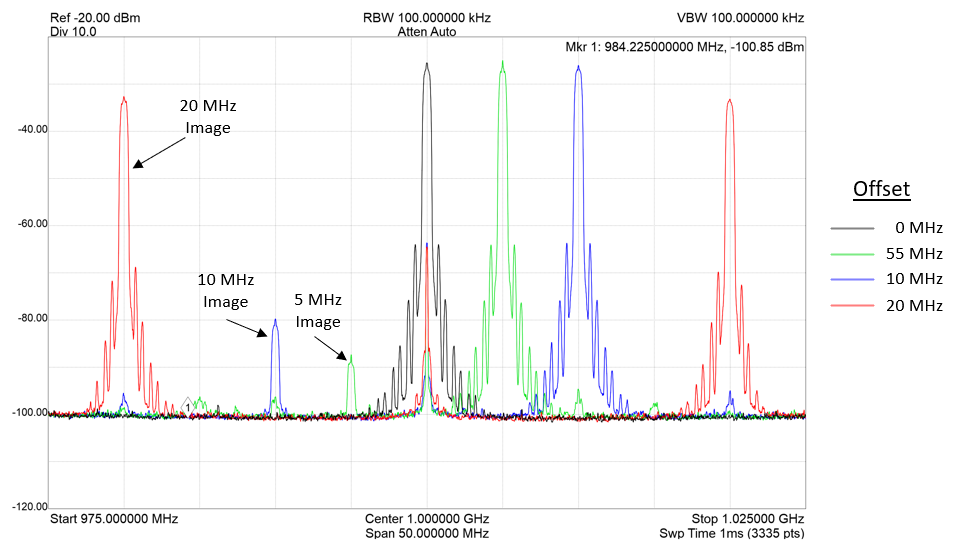
Figure 15: Images of transmit offset.
There are four variants of the transmit_from_file_app application. Each application specifies the DRC but have a unique component specifically for converting samples to complex short based on specified file sample data type. If the data type of the samples in the file are complex short, this component is not required. The respective application is selected by the --file-type option.
- –file-type “short”
apps/transmit_from_file_app_s.xml
- –file-type “float32”
apps/transmit_from_file_app_f.xml
- –file-type “sc16”
apps/transmit_from_file_app_xs.xml
- –file-type “fc32”
apps/transmit_from_file_app_xf.xml
Hardware Portability
A single OpenCPI Application and HDL Assembly may be ported to support OpenCPI compliant platforms. Currently, the application has been tested for the following OpenCPI platforms:
Ettus E310
Analog Device ADALM-Pluto
Digilent ZedBoard with Analog Device FMCOMMS2 daughter board
AMD Zynq UltraScale+ MPSoC ZCU104
This application has been tested and verified to execute on the following platforms:
e31x
plutosdr
zed
zcu104
ubuntu22_04
ubuntu20_04
Execution
Please refer to the transmit_from_file_app application README.md file in the project’s git repository for instructions to build and execute the transmit_from_file Application.
Limitations
At this time, the DRC does not implement IQ imbalance correction which may occur due to complex mixing. However, an IQ imbalance component is available in the SDR components library and will be incorporated into the DRC in a future patch release.
Troubleshooting
None at this time.
Worker Artifacts
The application currently supports an all HDL component assembly. The assembly is located in the following directory:
~/opencpi/projects/examples/hdl/assemblies/transmit_from_file_app/
Three platform container files are available to build the assembly for the zed, e31x, zcu104 and plutosdr platforms and located in the assembly directory.