File Read (file_read)
Injects file-based data into an application.
file_read is an asset in the ocpi.core component library.
Implementations include the
file_read HDL Worker (file_read.hdl) and the file_read RCC Worker (file_read.rcc).
Tested platforms include
centos7, isim, modelsim, xilinx13_3, xilinx13_4, and xsim.
Function
The file read component injects file-based data into an application. To use it, specify
a file_read component instance and connect its output port to an input port of the
component that is to process the data first. Use the fileName property to specify
the name of the file to be read.
This component has one output port whose name is out,
which carries the messages conveying data read from the file. There is no protocol associated with the port:
it is agnostic as to the protocol of the file data and the connected input port.
Operating Modes
The file read component has two modes of operation: data streaming and messaging.
Data-streaming Mode
In data-streaming mode, the contents of the file become the payloads of a stream of messages,
each carrying a fixed number of bytes of file data (until the last) and all with the same opcode.
The opcode of all output messages is specified in the opcode property.
The length of all output messages except the last one are based on the buffer size
assigned to the output port by the container it is running in. See the “Buffersize Attribute”
section in the OpenCPI Application Development Guide for details.
If the number of bytes in the file is not an even multiple of the buffer size,
the remaining bytes are sent in a final, shorter message.
The granularity of messages can also be specified with the granularity property.
This forces the message size to be a
multiple of this value, and forces truncation of the final message
to be a multiple of this value. The default granularity is 1.
Messaging Mode
In messaging mode, the contents of the file are interpreted as a sequence of defined messages with an 8-byte header in the file itself preceding the data for each message. This header contains the message length and opcode, with the message data contents following the header. The length can be zero, which means that a message will be sent with the indicated opcode, but the message will carry no data.
The first 32-bit word of the header is interpreted as the message length in bytes, little endian. The next 8-bit byte is the opcode of the message, followed by three padding bytes. For example, in the C language (on a little-endian processor):
struct {
  uint32_t messageLength;
  uint8_t  opcode;
  uint8_t  padding[3];
};
This format of messages in a file is the format produced by the File Write (file_write) component when in messaging mode.
If the end of the file is encountered while reading a message header, or while reading the header-specified length of the message payload, an error will be reported and the component will report a fatal error.
The messaging file field layout is shown in Figure 3:
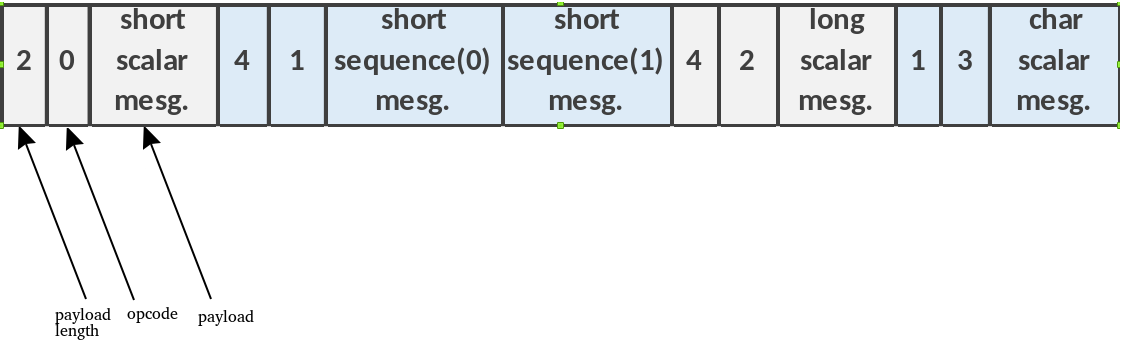
Figure 3: Messaging File Field Layout
Implications of No Protocol on Port
The output port on the file read component has no protocol. This means that
the data file must be formatted to match the protocol of the connected component’s
input port. In data-streaming mode, the file structure needs to correspond
to the opcode specified by the opcode property. In messaging mode, it means
only using opcodes and payloads in the file that correspond to the protocol
of the connected component.
End-of-File Handling
When the file read component reaches the end of its input file, it does one of three things:
Asserts an EOF condition on its output and enters the “finished” state
Enters the
finishedstate with no further action, when thesuppressEOFproperty istrueRestarts reading at the beginning of the file, when the
repeatproperty istrue
Interface
<!--
The file reader reads a file and sends data to the "out" port.
Properties:
 messagesInFile: indicates that messages, including length and opcode, will be in the file
 opcode: indicates a fixed opcode to use, defaults to zero
 messageSize: indicates the size of messages
 granularity: incidates that the last message will be truncated to be a multiple of this.
-->
<ComponentSpec>

  <DataInterfaceSpec Name="out" Producer="true">
    <protocolsummary numberofopcodes='256'/>
  </DataInterfaceSpec>

  <!-- Setup/initial properties -->

  <!-- File name to read from -->
  <property name='fileName' type='string' stringLength='1024' initial='true'/>
  <!-- Does the file contain messages with opcodes and lengths? -->
  <property name='messagesInFile' type='bool' initial='true' default='false'/>
  <!-- Fixed opcode value if previous value is false -->
  <property name='opcode' type='uchar' initial='true' default='0'/>
  <!-- Fixed message size if messagesInFile is false, letting the default come from the system's actual buffer sizes
       which will be the most efficient -->
  <property name='messageSize' type='ulong' initial='true' default='0'/>
  <!-- Granularity of last message if non-zero and less than message size -->
  <property name='granularity' type='ulong' initial='true' default='1'/>

  <!-- Read the file repeatedly -->
  <property name='repeat' type='bool' writable='true'/>

  <!-- Readback status properties -->
  <property name='bytesRead' type='uLongLong' volatile='true'/>
  <property name='messagesWritten' type='uLongLong' volatile='true'/>
  <property name='suppressEOF' type='bool' initial='true'/>
  <!-- a message-in-file header was bad or a read error occurred -->
  <property name='badMessage' type='bool' volatile='true'/>
</ComponentSpec>
Properties
fileName: The name of the file whose contents are sent out as raw data to the output port.Type:
stringAccess:
Parameter:
FalseWritable:
FalseInitial:
TrueVolatile:
False
Default value:
None
messagesInFile: The flag used to turn messaging mode on and off.Type:
boolAccess:
Parameter:
FalseWritable:
FalseInitial:
TrueVolatile:
False
Default value:
false
opcode: In data-streaming mode, the opcode for all outgoing messages.Type:
ucharAccess:
Parameter:
FalseWritable:
FalseInitial:
TrueVolatile:
False
Default value:
0
messageSize: The flag used to override system- or application-specified buffer size.Type:
ulongAccess:
Parameter:
FalseWritable:
FalseInitial:
TrueVolatile:
False
Default value:
0
granularity: The granulatiry of outgoing messages.Type:
ulongAccess:
Parameter:
FalseWritable:
FalseInitial:
TrueVolatile:
False
Default value:
1
repeat: The flag used to repeat reading the data file at EOF.Type:
boolAccess:
Parameter:
FalseWritable:
TrueInitial:
FalseVolatile:
False
Default value:
None
bytesRead: The number of bytes read from the file. Useful when debugging data flow issues.Type:
ulonglongAccess:
Parameter:
FalseWritable:
FalseInitial:
FalseVolatile:
True
Default value:
None
messagesWritten: The number of messages written to the output port. Useful when debugging data flow issues.Type:
ulonglongAccess:
Parameter:
FalseWritable:
FalseInitial:
FalseVolatile:
True
Default value:
None
suppressEOF: The flag used to enable/disable assertiong of the final EOF.Type:
boolAccess:
Parameter:
FalseWritable:
FalseInitial:
TrueVolatile:
False
Default value:
None
badMessage: The flag set by a worker when it has a problem getting data from the file; for example, when the file name is bad.Type:
boolAccess:
Parameter:
FalseWritable:
FalseInitial:
FalseVolatile:
True
Default value:
None
The messageSize property should be rarely used. Its default value of zero indicates
that the system-determined buffer size will be used. The system’s default buffer size is
determined as described in the “Buffersize Attribute” section
of the OpenCPI Application Development Guide, and can be overridden in
the OAS for the connection between the output of file read and whatever
component is connected to it. If the messagesInFile property is true (that is, the
component is operating in messaging mode), the buffer size must be large enough to
accommodate the largest message found in the file. It is always better to set the
message size on connections in the OAS (or using OA::PValues in the ACI)
than to use this property, since the former method is universal for specifying buffer sizes
for all connections in the application.
Ports
Inputs:
None.
Outputs:
out: Data streamed from file.Protocol:
NoneOptional:
False
Implementations
file_read(HDL)Application HDL worker that only runs on FPGA simulator platforms. This worker will not run or be built for any FPGA hardware platforms because it contains code that cannot be realized into RTL.
file_read(RCC)Application RCC worker implemented in the C language version of the RCC model. Newer RCC workers are implemented in the C++ language version of the RCC model.
Example Application
<?xml version="1.0"?>
<!-- This file is protected by Copyright. Please refer to the COPYRIGHT file
     distributed with this source distribution.

     This file is part of OpenCPI <http://www.opencpi.org>

     OpenCPI is free software: you can redistribute it and/or modify it under
     the terms of the GNU Lesser General Public License as published by the Free
     Software Foundation, either version 3 of the License, or (at your option)
     any later version.

     OpenCPI is distributed in the hope that it will be useful, but WITHOUT ANY
     WARRANTY; without even the implied warranty of MERCHANTABILITY or FITNESS
     FOR A PARTICULAR PURPOSE. See the GNU Lesser General Public License for
     more details.

     You should have received a copy of the GNU Lesser General Public License
     along with this program. If not, see <http://www.gnu.org/licenses/>. -->
<application done="file_write">
  <instance component="ocpi.core.file_read" connect="file_read">
    <property name="filename" value="input.bin"/>
  </instance>
  <instance component="ocpi.core.file_read" connect="file_write">
  </instance>
  <instance component="ocpi.core.file_write">
    <property name="filename" value="output.bin"/>
  </instance>
</application>
Dependencies
The dependencies on other elements in OpenCPI are:
None.
Limitations
Limitations of file_read are:
None.
Testing
All test benches use the worker implementation as part of the verification process. This component does not have a component unit test suite.