Triggered Sampler (triggered_sampler_us)
Upon trigger (either property change, data on optional input port, or meta data on data port) gate capture_length samples followed by an optional flush, and a discontinuity.
Design
When triggered, capture_length samples are transferred from input to output. These samples are preceded by time and sample_interval operations if the corresponding data is available, and are followed by an optional flush, and a discontinuity.
Single captures are triggered through a write to a property, optional receipt of input metadata or input data on a second optional trigger port. The component also supports a continuous capture mode (controlled through a property), in which captures are repeatedly performed; although it should be noted that a discontinuity will still exist between captures in this mode.
More specifically, captures are triggered when:
true is written to the
capture_singleproperty, orthe
capture_continuousproperty is true and there is no capture currently in progress, orthe
capture_on_metaproperty is true and any metadata message is received oninputport, orany message is received on the optional
triggerport.
Triggers that occur simultaneously (i.e. within the same cycle in HDL or on the same call to run() in RCC) will result in a single capture.
If additional triggers occur during a capture, another capture is performed once the current capture is complete.
Output sample messages will always be aligned to input sample messages. Once a capture is triggered, the sample output will begin with the start of the next input sample message. Output sample messages will be the same size as the input sample messages, except possibly the final message in a capture which may be shorter to achieve the correct capture size.
The following diagrams depict typical message flows for the four trigger cases. In these examples it is assumed that time and sample interval are known, and are therefore output prior to each capture.
Capture Single

Figure 175: Capture single
Capture Continuous
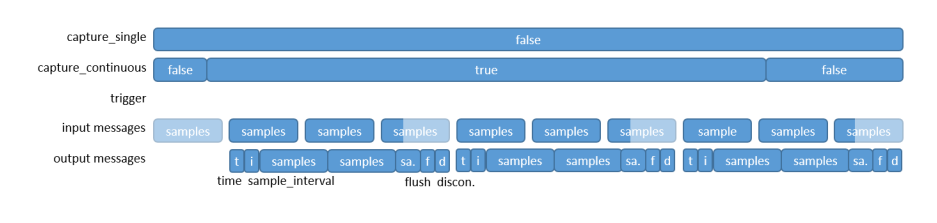
Figure 176: Capture continuous
Trigger Port Operation

Figure 177: Trigger port operation
Metadata Operation
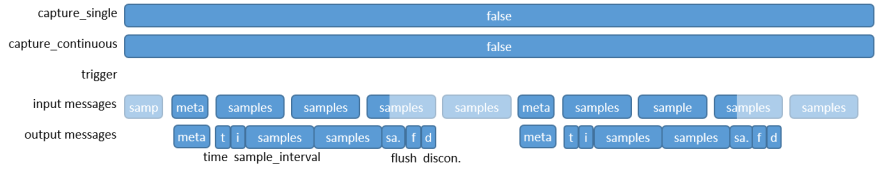
Figure 178: Metadata operation
Bypass Mode
The component also supports a bypass mode which disables the capture triggers and simply routes all input messages to output.
While in bypass mode, the behaviour of the capture triggers is:
capture_single- writing true does nothing - no capture is queued.
capture_continuous- writing true will cause captures to start once bypass mode completes.trigger port - no captures are queued.
metadata message - no captures are queued.
When entering bypass mode:
Any pending captures are cancelled.
Any current capture is aborted - no flush or discontinuity are generated.
Interface
<?xml version="1.0"?>
  <property name="bypass" type="bool" writable="true" default="false"
    description="When ``true``, trigger functionality is disabled: all messages received on input are routed straight to output."/>
  <property name="capture_length" type="ulong" writable="true" default="1"
    description="Controls the number of samples in each capture."/>
  <property name="send_flush" type="bool" writable="true" default="false"
    description="When ``true``, a flush is sent after the samples and before the discontinuity."/>
  <property name="capture_on_meta" type="bool" writable="true" default="true"
    description="When ``true``, a capture is triggered on receipt of a metadata message on ``input``."/>
  <property name="capture_single" type="bool" writable="true" volatile="true" default="false"
    description="Writing ``true`` triggers a single capture."/>
  <property name="capture_continuous" type="bool" writable="true" default="false"
    description="When ``true``, back-to-back captures will be performed."/>
  <property name="capture_in_progress" type="bool" writable="false" volatile="true"
    description="Returns ``true`` when one or more captures are pending or in progress from any source."/>
  <!-- LINT EXCEPTION: xml_012: -1: Capture_in_progress does not require
       a default value, as it's not writable -->
  <!-- Samples are captured from this port. -->
  <port name="input" producer="false" protocol="ushort_timed_sample-prot"/>
  <!-- A capture is triggered when any message is received on this port. -->
  <port name="trigger" producer="false" optional="true"/>
  <!-- Captured samples are output on this port. -->
  <port name="output" producer="true" protocol="ushort_timed_sample-prot"/>
</componentspec>
Ports
Inputs:
input: Primary input samples port.Protocol:
ushort_timed_sample-protOptional:
False
trigger: Optional trigger port.Protocol:
NoneOptional:
True
Outputs:
output: Primary output samples port.Protocol:
ushort_timed_sample-protOptional:
False
Opcode Handling
On input port:
Time
Re-synchronises an internal sample time counter that is used to generate correct output time messages.
During a capture, message is forwarded to output.
In bypass mode, message is forwarded to output.
Sample_Interval
Value is stored and used for maintaining the internal sample time counter.
During a capture, message is forwarded to output.
In bypass mode, message is forwarded to output.
Flush
Outside of a capture, flush is forwarded to output.
During a capture:
The current output samples message is completed.
The received flush is forwarded to output.
The capture continues and any remaining samples are forwarded when they arrive.
This results in a single capture of
capture_lengthsamples, but with an extra flush in the middle.In bypass mode, message is forwarded to output.
Discontinuity
Invalidates the internal sample time counter.
In non-bypass mode and outside of a capture, only the internal sample counter is invalidated, no data is forwarded to output.
During a capture:
The current output samples message is completed.
The received discontinuity is forwarded to output.
The capture continues and any remaining samples are forwarded when they arrive.
This results in a single capture of
capture_lengthsamples, but with an extra discontinuity in the middle.In bypass mode, message is forwarded to output.
Metadata
In non-bypass mode and outside of a capture, this optionally triggers a capture.
During a capture, this optionally queues another capture to start when the current one completes.
Received metadata messages are always passed to output.
Samples
In all modes, the internal sample time counter is incremented and the samples are dropped.
During a capture, the samples are passed to the output.
In bypass mode, the message is forwarded to output.
On trigger port
Any message received on this port while in non-bypass mode will trigger a single capture. The trigger port is read from continuously until there are no more messages present on the trigger port. After checking the trigger port, the input port is checked to handle any incoming opcodes. A maximum of two captures can be queued at any one time (regardless of how the capture was initially triggered). If a trigger is received while two captures are already queued (i.e. one capture is pending and one capture is queued), then the trigger port is advanced and the trigger ignored. Otherwise, if a capture is pending, but no capture is queued, receipt of input on the trigger port will cause a capture to be queued. If no captures are pending or queued, then an incoming trigger will cause a capture to start, pending arrival of Sample opcodes.
All received messages are otherwise discarded; nothing is forwarded to the output port.
On output port:
Time
If known, time is sent at the start of every capture (ahead of interval and samples)
It won’t be known if a time has not been received since start or since most recent discontinuity.
Time messages received on input during a capture or bypass mode are forwarded to output.
Sample_Interval
If known, sample_interval is sent at the start of every capture (just after time)
It won’t be known if an interval has not been received since start.
Sample_interval messages received on input during a capture or bypass mode are forwarded to output.
Flush
Optionally sent (controlled by “send_flush” property) after the last sample in a capture.
Flush messages received on input at any time are forwarded to output.
Discontinuity
Sent at the end of every capture (after the optional flush).
Discontinuity messages received on input during a capture or bypass mode are forwarded to output.
Metadata
Metadata messages received on input at any time are forwarded to output.
Samples
Sample messages received on input during a capture or bypass mode are forwarded to output.
Properties
bypass: Whentrue, trigger functionality is disabled: all messages received on input are routed straight to output. Whenfalse, the component is in normal mode and the capture functionality is enabled.Type:
boolAccess:
Parameter:
FalseWritable:
TrueInitial:
FalseVolatile:
False
Default value:
false
capture_length: Controls the number of samples in each capture. Changes only affect captures which have yet to start (even if they have been triggered, but are pending completion of a previous capture). Minimum = 1, Maximum = \(2^{32}-1\).Type:
ulongAccess:
Parameter:
FalseWritable:
TrueInitial:
FalseVolatile:
False
Default value:
1
send_flush: Whentrue, a flush is sent after the samples and before the discontinuity.Type:
boolAccess:
Parameter:
FalseWritable:
TrueInitial:
FalseVolatile:
False
Default value:
false
capture_on_meta: Whentrue, a capture is triggered on receipt of a metadata message oninput.Type:
boolAccess:
Parameter:
FalseWritable:
TrueInitial:
FalseVolatile:
False
Default value:
true
capture_single: Writingtruetriggers a single capture. Writingtruetriggers a single capture. It will returntrueuntil the capture actually starts (this is almost immediate if there is no capture in progress). Writingtrueagain during a capture causes another capture to be queued to start when the current one finishes. It will returntrueuntil that second capture actually starts. Writingtruewhile it is alreadytrue(i.e. when another capture is queued) does nothing. Writingfalsewhile it istrue(i.e. when another capture is queued) cancels that queued capture. Note that the return value indicates whether a capture has started - not completed. It does not returntruewhen captures are triggered by metadata or trigger port messages. To check if all the requested captures have completed, readcapture_in_progress. Ifcapture_singleistrueon entry to bypass mode, it will immediately becomefalse, thus cancelling any queued capture. In bypass mode, any value written to this is ignored, and it will returnfalse.Type:
boolAccess:
Parameter:
FalseWritable:
TrueInitial:
FalseVolatile:
True
Default value:
false
capture_continuous: Whentrue, back-to-back captures will be performed. Note that when one capture finishes, the next capture will start at the beginning of the next sample message - there may be a gap in samples between the captures, depending on the message and capture lengths. Writefalseto cease capturing at the end of the current capture. In bypass mode, any value written will be stored and returned, although no captures will be performed. Iftrueis written during bypass mode, captures will begin when the component returns to normal mode.Type:
boolAccess:
Parameter:
FalseWritable:
TrueInitial:
FalseVolatile:
False
Default value:
false
capture_in_progress: Returnstruewhen one or more captures are pending or in progress from any source. Returnsfalsewhen no captures are pending. In bypass mode, this returnsfalse.Type:
boolAccess:
Parameter:
FalseWritable:
FalseInitial:
FalseVolatile:
True
Default value:
None
Implementations
triggered_sampler_us(HDL)The Triggered Sampler primitive implements the functionality for all HDL workers. The workers provide only a very thin data type conversion layer. Because there is no sample data processing, this single primitive can be used for all protocol variants.
triggered_sampler_us(RCC)
Example Application
<?xml version="1.0"?>
<application done="file_write">
  <instance component="ocpi.core.file_read" connect="triggered_sampler_us" to="input">
    <property name="filename" value="input.bin"/>
  </instance>
  <instance component="ocpi.comp.sdr.util.triggered_sampler_us" connect="file_write">
    <property name="bypass" value="false"/>
    <property name="capture_length" value="1000"/>
    <property name="send_flush" value="true"/>
    <property name="capture_on_meta" value="true"/>
    <property name="capture_single" value="false"/>
    <property name="capture_continuous" value="false"/>
  </instance>
  <instance component="ocpi.core.file_write">
    <property name="filename" value="output.bin"/>
  </instance>
</application>
Dependencies
The dependencies to other elements in OpenCPI are:
There is also a dependency on:
ieee.std_logic_1164
Limitations
Limitations of triggered_sampler_us are:
None
Testing
Tested platforms: None
Component testing not completed.