Multiplexer (multiplexer_ul)
Uses either a port or property to control which input passes through data to the output.
Design
Passes data through from a selected input to the output. The selected input is specified either by the port_select property or by a sample received on inselect port.
When port_select_enable is true, the inselect port sets whether input_1 or input_2 is passed through. If false, the property port_select sets which input is passed through.
A value of false for property port_select or port inselect results in input_1 being passed through, otherwise input_2 is passed through.
Data on input_1 and input_2 is taken at the output sample rate. Data on inselect is taken as soon as it is available.
The last received sample value on the inselect port is stored and used thereafter for all further processing until another sample is received. All non-sample opcodes passed to the inselect port are discarded. An entire message on the selected input is passed through for each inselect sample value. If a message exists on the non-selected port it is taken but not passed through.
Switching between inputs only occurs between messages on the selected input. If a switch occurs and the port that is switched to is mid-message, the output advances no data until the entire message on that port has been taken.
A block diagram representation of the implementation is given in Figure 122:.
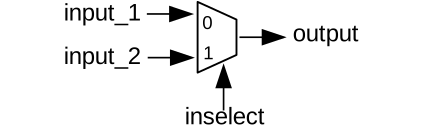
Figure 122: Multiplexer implementation.
Interface
<?xml version="1.0"?>
<componentspec>
  <property name="port_select_enable" type="bool" writable="true" default="false"
    description="False implies the ``port_select`` property specifies which input to pass to the output, otherwise, the input port
      is specified by the data on the ``inselect`` port."/>
  <property name="port_select" type="bool" writable="true" default="false"
    description="Selects which input port data is passed to the output. When ``port_select`` is false, data on ``input_1`` is
      passed to the output."/>
  <port name="input_1" producer="false" protocol="ulong_timed_sample-prot"/>
  <port name="input_2" producer="false" protocol="ulong_timed_sample-prot"/>
  <port name="inselect" producer="false" protocol="bool_timed_sample-prot" optional="true"/>
  <port name="output" producer="true" protocol="ulong_timed_sample-prot"/>
</componentspec>
Ports
Inputs:
input_1: Input samples port.Protocol:
ulong_timed_sample-protOptional:
False
input_2: Input samples port.Protocol:
ulong_timed_sample-protOptional:
False
inselect: Optional input select port.Protocol:
bool_timed_sample-protOptional:
True
Outputs:
output: Primary output samples port.Protocol:
ulong_timed_sample-protOptional:
False
Opcode Handling
The multiplexer function is applied on all data, regardless of opcode type.
Properties
port_select_enable: False implies theport_selectproperty specifies which input to pass to the output, otherwise, the input port is specified by the data on theinselectport.Type:
boolAccess:
Parameter:
FalseWritable:
TrueInitial:
FalseVolatile:
False
Default value:
false
port_select: Selects which input port data is passed to the output. Whenport_selectis false, data oninput_1is passed to the output.Type:
boolAccess:
Parameter:
FalseWritable:
TrueInitial:
FalseVolatile:
False
Default value:
false
Implementations
Example Application
<?xml version="1.0"?>
<application done="file_write">
  <instance component="ocpi.core.file_read" connect="multiplexer_ul" to="input_1">
    <property name="filename" value="input_1.bin"/>
  </instance>
  <instance component="ocpi.core.file_read" connect="multiplexer_ul" to="input_2">
    <property name="filename" value="input_2.bin"/>
  </instance>
  <instance component="ocpi.comp.sdr.multiplexer_ul" connect="file_write">
    <property name="port_select_enable" value="false"/>
    <property name="port_select" value="true"/>
  </instance>
  <instance component="ocpi.core.file_write">
    <property name="filename" value="output.bin"/>
  </instance>
</application>
Dependencies
There is a dependency on:
ieee.std_logic_1164
ieee.numeric_std
Limitations
Limitations of multiplexer_ul are:
Setting property
port_select_enabletotrueis untested.
Testing
Tested platforms: None
Component testing not completed.