Splitter (splitter_xs)
Splits a single input into multiple outputs.
Design
This Splitter implementation splits (purely duplicates) the input to one or more (up to four) outputs. All connected outputs must be ready to accept data before any data is output by the component.
The RCC worker checks that all connected ports are ready before outputting data.
The HDL worker uses the output_X_in.reset signal to test whether an output port is connected. If a port is not connected the logic by default sets it to be ready all the time.
The mathematical representation of the implementation is given in (70).
In (70):
\(x[n]\) is the input values.
\(y_1[n]\) is the output values.
\(y_2[n]\), :math:’y_3[n]’ and :math:’y_4[n]’ are the optional output values.
A block diagram representation of the implementation is given in Figure 124:.
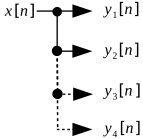
Figure 124: Splitter diagram
Interface
<?xml version="1.0"?>
<componentspec>
  <port name="input" producer="false" protocol="complex_short_timed_sample-prot"/>
  <port name="output_1" producer="true" protocol="complex_short_timed_sample-prot"/>
  <port name="output_2" producer="true" optional="true" protocol="complex_short_timed_sample-prot"/>
  <port name="output_3" producer="true" optional="true" protocol="complex_short_timed_sample-prot"/>
  <port name="output_4" producer="true" optional="true" protocol="complex_short_timed_sample-prot"/>
</componentspec>
Ports
Inputs:
input: Input samples port.Protocol:
complex_short_timed_sample-protOptional:
False
Outputs:
output_1: Output samples port.Protocol:
complex_short_timed_sample-protOptional:
False
output_2: Optional output samples port.Protocol:
complex_short_timed_sample-protOptional:
True
output_3: Optional output samples port.Protocol:
complex_short_timed_sample-protOptional:
True
output_4: Optional output samples port.Protocol:
complex_short_timed_sample-protOptional:
True
Opcode Handling
All Opcodes are passed through, duplicated to each output port.
Properties
None.
Implementations
Example Application
<?xml version="1.0"?>
<application done="file_write">
  <instance component="ocpi.core.file_read" connect="splitter_xs">
    <property name="filename" value="input.bin"/>
  </instance>
  <instance component="ocpi.comp.sdr.interface.splitter_xs"/>
  <connection>
    <port instance="splitter_xs" name="output_1"/>
    <port instance="file_write_1" name="input"/>
  </connection>
  <instance component="ocpi.core.file_write" name="file_write_1">
    <property name="filename" value="output_1.bin"/>
  </instance>
  <connection>
    <port instance="splitter_xs" name="output_2"/>
    <port instance="file_write_2" name="input"/>
  </connection>
  <instance component="ocpi.core.file_write" name="file_write_2">
    <property name="filename" value="output_2.bin"/>
  </instance>
  <connection>
    <port instance="splitter_xs" name="output_3"/>
    <port instance="file_write_3" name="input"/>
  </connection>
  <instance component="ocpi.core.file_write" name="file_write_3">
    <property name="filename" value="output_3.bin"/>
  </instance>
  <connection>
    <port instance="splitter_xs" name="output_4"/>
    <port instance="file_write_4" name="input"/>
  </connection>
  <instance component="ocpi.core.file_write" name="file_write_4">
    <property name="filename" value="output_4.bin"/>
  </instance>
</application>
Testing
Tested platforms: None
Component testing not completed.